Real-time wireless control
Joystick axes are mapped to a −1000…+1000 range and packed into a compact RC_Command struct sent every 50 ms — low enough latency to feel direct.
3D-printed RC car controlled by Raspberry Pi Pico over nRF24L01+ radio.
An RC car built from the ground up — printed, wired and programmed end to end. A handheld controller reads an analog joystick and streams steering and throttle commands over a 2.4 GHz radio link to the vehicle, which drives its motors and steering servo in real time. The whole thing runs on two Raspberry Pi Pico boards and a few hundred lines of modern C++.
Joystick axes are mapped to a −1000…+1000 range and packed into a compact RC_Command struct sent every 50 ms — low enough latency to feel direct.
Dynamic payloads, auto-retries (5×, 15 cycles) and a noise-filtered power rail keep the nRF24L01+ link stable even near the motors.
A wheel encoder feeds back speed, opening the door to cruise control and traction tuning on the car firmware.
Chassis, steering linkage and electronics mounts are all custom-printed and iterated alongside the firmware.
A single CMake + Ninja build produces both controller.uf2 and car.uf2, sharing the RF24 driver between them.
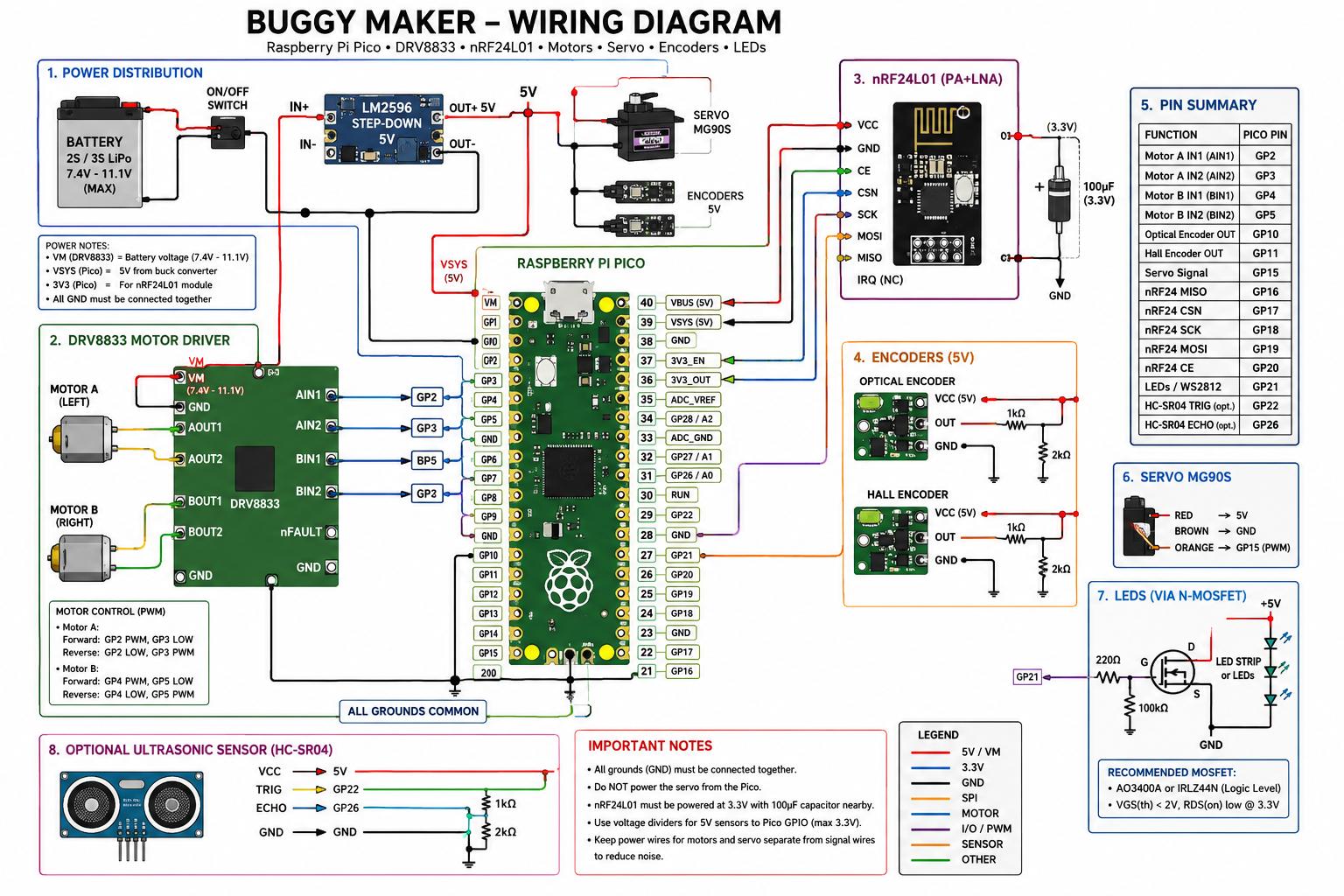
| Component | Qty | Notes |
|---|---|---|
| Raspberry Pi Pico | 1 | Main receiver / controller (RP2040) |
| DC Motor | 2 | Wheel drive via PWM |
| MG series servo | 1 | Steering — 50 Hz, 1000–2000 µs range |
| nRF24L01+ module | 1 | 2.4 GHz wireless, channel 108 |
| DC-DC converter (battery) | 1 | Battery regulation for motor supply |
| DC-DC converter (logic) | 1 | Stable 3.3 V for Pico and sensors |
| Capacitors | several | Noise filtering on nRF24L01+ power rail |
| Encoder | 1 | Wheel speed measurement |
| Component | Qty | Notes |
|---|---|---|
| Raspberry Pi Pico | 1 | Transmitter / handheld controller (RP2040) |
| nRF24L01+ module | 1 | Wireless communication |
| KY-023 analog joystick | 1 | VRX = ADC1, VRY = ADC0, SW = GPIO 22 |
MISO |
GPIO 12 |
MOSI |
GPIO 11 |
SCK |
GPIO 14 |
CSN |
GPIO 15 |
CE |
GPIO 13 |
MOTOR1_INA |
GPIO 2 |
MOTOR1_INB |
GPIO 3 |
MOTOR2_INA |
GPIO 4 |
MOTOR2_INB |
GPIO 5 |
SERVO_PIN |
GPIO 8 |
ENCODER1_A |
GPIO 10 |
ENCODER1_B |
GPIO 6 |
MISO |
GPIO 4 |
MOSI |
GPIO 3 |
SCK |
GPIO 2 |
CSN |
GPIO 5 |
CE |
GPIO 17 |
VRX |
GPIO 27 / ADC1 |
VRY |
GPIO 26 / ADC0 |
SW |
GPIO 22 |
Packet sent every 50 ms from the controller to the car.
struct RC_Command {
    int16_t steering;  // X axis  -1000 ... +1000
    int16_t throttle;  // Y axis  -1000 ... +1000
    uint8_t buttons;   // button bitmask
};
| Channel | 108 |
| Data rate | RF24_250KBPS |
| PA level | RF24_PA_LOW |
| Dynamic payloads | enabled |
| Retries | setRetries(5, 15) |
| TX cycle | 50 ms |
| Tool | Version |
|---|---|
| Raspberry Pi Pico SDK | 2.2.0 |
| ARM GNU toolchain | arm-none-eabi-gcc |
| CMake | 3.13+ |
| Ninja | latest |
| Picotool | optional — recommended for terminal flashing |
| Git | submodule support required |
Clone the repo with all submodules.
$ git clone --recurse-submodules https://github.com/truposky/remote_car.git
$ cd remote_car
Already cloned without submodules?
$ git submodule update --init --recursive
If CMake can't find the SDK, export PICO_SDK_PATH first.
$ export PICO_SDK_PATH="$HOME/.pico-sdk/sdk/2.2.0"
$ cmake -B build -G Ninja
$ ninja -C build
Individual targets:
$ ninja -C build controller
$ ninja -C build car
Connect the Pico in BOOTSEL mode, then copy the .uf2 file to the mounted drive — or use picotool:
$ picotool load build/controller/controller.uf2 -fx
$ picotool load build/car/car.uf2 -fx
Output files:
build/controller/controller.uf2
build/car/car.uf2
Libraries linked per target.
| Target | Linked libraries |
|---|---|
| controller | RF24, pico_stdlib, hardware_spi, hardware_gpio, hardware_adc |
| car | RF24, pico_stdlib, hardware_spi, hardware_gpio, hardware_pwm |
Comments
0 commentsNo comments yet — be the first to leave one.